<?xml version="1.0" encoding="utf-8"?><feed xmlns="http://www.w3.org/2005/Atom" ><generator uri="https://jekyllrb.com/" version="3.10.0">Jekyll</generator><link href="https://dongkwan-kim.github.io/feed.xml" rel="self" type="application/atom+xml" /><link href="https://dongkwan-kim.github.io/" rel="alternate" type="text/html" /><updated>2026-11-09T11:24:24+09:00</updated><id>https://dongkwan-kim.github.io/feed.xml</id><title type="html">Dongkwan Kim</title><subtitle>personal description</subtitle><author><name>Dongkwan Kim</name><email>dongkwan.kim@tamu.edu</email></author><entry><title type="html">Chrome Extensions for Computer Science Graduate Students</title><link href="https://dongkwan-kim.github.io/blogs/chrome-extensions-for-computer-science-grads/" rel="alternate" type="text/html" title="Chrome Extensions for Computer Science Graduate Students" /><published>2025-11-26T00:00:00+09:00</published><updated>2025-11-26T00:00:00+09:00</updated><id>https://dongkwan-kim.github.io/blogs/chrome-extensions-for-computer-science-grads</id><content type="html" xml:base="https://dongkwan-kim.github.io/blogs/chrome-extensions-for-computer-science-grads/"><![CDATA[<p>A list of Chrome Extensions that might be useful to computer science graduate students.</p>

<h2 id="reading-and-writing">Reading and Writing</h2>

<h3 id="google-scholar-pdf-reader"><a href="https://chromewebstore.google.com/detail/google-scholar-pdf-reader/dahenjhkoodjbpjheillcadbppiidmhp">Google Scholar PDF Reader</a></h3>

<p>Supercharge your paper reading: follow references, skim outline, jump to figures, cite and save.</p>

<h3 id="google-scholar-author-highlighter"><a href="https://chromewebstore.google.com/detail/google-scholar-author-hig/ijmngekkpaccbbjimedfkjpigplaikah">Google Scholar Author Highlighter</a></h3>

<p>Highlights first-author, second-author, co-first-author and last-author papers on Google Scholar profile pages</p>

<p>This extension automatically scans your Google Scholar profile and highlights papers by your authorship role. It detects and color-codes when you are: First author, Second author, Co-first author (symbols such as †, ‡, §, *, #), Last author</p>

<h3 id="gscholarlens"><a href="https://chromewebstore.google.com/detail/gscholarlens/lgbaopmimcnpphepmfphadncdofnojnd">GScholarLENS</a></h3>

<p>Advanced Insights into Google Scholar Profiles.</p>

<p>GScholarLENS is a browser extension designed for academics, researchers, and enthusiasts who want deeper insights into publication data and contribution of an author from Google Scholar.</p>

<h3 id="openreview-quicklook"><a href="https://chromewebstore.google.com/detail/openreview-quicklook/efoabjckcjahofacmgekfhjadpjlmcap?hl=en&amp;authuser=0">Openreview Quicklook</a></h3>

<p>Quicklook the summary of openreview submission</p>

<p>It is unfriendly to get the submission information quickly, such as the ratings and the final accept/reject decision. This tool display such summary in a box, and you will never need to scroll all the page first before getting such information.</p>

<h3 id="redirectify"><a href="https://chrome.google.com/webstore/detail/redirectify/mhjmbfadcbhilcfdhkkepffbnjaghfie">Redirectify</a></h3>
<p>Redirects requests for PDFs of papers at some popular sites to their corresponding HTML index pages.
(For example, <a href="https://arxiv.org/pdf/1602.07527.pdf">this pdf link</a> redirects to <a href="https://arxiv.org/abs/1602.07527">this webpage</a>)</p>

<h3 id="grammarly-for-chrome"><a href="https://chrome.google.com/webstore/detail/grammarly-for-chrome/kbfnbcaeplbcioakkpcpgfkobkghlhen">Grammarly for Chrome</a></h3>
<p>Use Grammarly on Chrome.</p>

<h3 id="open-in-overleaf"><a href="https://chrome.google.com/webstore/detail/open-in-overleaf/oikhlgfcmfbbdjbeeaplalpfdgijbdji">open-in-overleaf</a></h3>
<p>Access the LaTeX source code of arXiv papers on Overleaf.</p>

<h2 id="general">General</h2>

<h3 id="dark-reader"><a href="https://chrome.google.com/webstore/detail/dark-reader/eimadpbcbfnmbkopoojfekhnkhdbieeh">Dark Reader</a></h3>
<p>Inverts brightness of web pages and aims to reduce eyestrain while browsing the web.</p>

<h2 id="codes">Codes</h2>

<h3 id="octotree"><a href="https://chrome.google.com/webstore/detail/octotree/bkhaagjahfmjljalopjnoealnfndnagc">Octotree</a></h3>
<p>Create easy-to-navigate code tree in Github, for file browsing and downloads.</p>

<h2 id="for-koreans">For Koreans</h2>

<h3 id="koreadropdown"><a href="https://chromewebstore.google.com/detail/koreadropdown/mfnlknmbkfnlgcjebdogolbakcekohfj">KoreaDropdown</a></h3>

<p>KoreaDropdown은 웹사이트의 드롭다운 메뉴에서 ‘Korea’를 자동으로 선택하는 크롬 확장 프로그램입니다.</p>

<h2 id="i-am-not-using-them-anymore">I am not using them anymore</h2>

<h3 id="scholar-highlights"><a href="https://chromewebstore.google.com/detail/scholar-highlights/jbmdpjnflbojepjppicneebdikjgkkpf">Scholar Highlights</a></h3>

<p>Highlights first (and co-first) author publications on Google Scholar. Note: Uses the Scholar author list, with asterisk (*) denoting co-authorship.</p>

<h3 id="refined-github"><a href="https://chrome.google.com/webstore/detail/refined-github/hlepfoohegkhhmjieoechaddaejaokhf">Refined GitHub</a></h3>
<p>Simplifies the GitHub interface and adds useful features</p>

<h3 id="code-finder-for-research-papers---catalyzex"><a href="https://chrome.google.com/webstore/detail/code-finder-for-research/aikkeehnlfpamidigaffhfmgbkdeheil">Code Finder for Research Papers - CatalyzeX</a></h3>
<p>Finds and shows links to code implementations for research papers directly on Google, Arxiv, Scholar, Twitter, Github, and more.</p>

<h3 id="overleaf-textarea"><a href="https://chrome.google.com/webstore/detail/overleaf-textarea/iejmieihafhhmjpoblelhbpdgchbckil/">Overleaf textarea</a></h3>
<p>This plugin displays your text in a textarea so you can use spellcheck plugins like Grammarly.
(It may not be that effective if your paper contains a bunch of equations.)</p>

<h3 id="copy-bibtex-in-1-click-on-gscholar"><a href="https://chrome.google.com/webstore/detail/bib-%E2%80%94-copy-bibtex-in-1-cl/onnmdchfagapkggbhnnjkmllimegclnh/related">Copy BibTex in 1 click on GScholar</a></h3>
<p>Copy BibTex from GScholar result page with 1 click!</p>

<h3 id="rooster-for-chrome"><a href="https://chrome.google.com/webstore/detail/rooster-for-chrome/pimolnhbniceppehbgmibnbgcnhpkhfh">Rooster for Chrome™</a></h3>
<p>Stay productive by giving you insights on browsing habits and by notifying.</p>

<h3 id="vertical-tabs"><a href="https://chrome.google.com/webstore/detail/vertical-tabs/pddljdmihkpdfpkgmbhdomeeifpklgnm">Vertical Tabs</a></h3>
<p>Display tabs vertically in a sidebar on web pages. Support drag-and-drop, search, filter on tabs.
(Sometimes this plugin creates a weird layout.)</p>

<h3 id="find-korea-from-dropdowns"><a href="https://chrome.google.com/webstore/detail/find-korea-from-dropdowns/lfphjcfkgaiiojhbippbghhdikoibedi">Find Korea from Dropdowns</a></h3>
<p>Find Korea when you go to academic conferences.</p>

<h3 id="auto-latex-equations"><a href="https://gsuite.google.com/marketplace/app/autolatex_equations/850293439076?pann=cwsdp&amp;hl=ko">Auto-LaTeX Equations</a></h3>
<p>Instantly convert every math equation in Google Docs documents into latex images.</p>]]></content><author><name>Dongkwan Kim</name><email>dongkwan.kim@tamu.edu</email></author><category term="General Computer Science &amp; Engineering" /><summary type="html"><![CDATA[A list of Chrome Extensions that might be useful to computer science graduate students.]]></summary></entry><entry><title type="html">Why Should the Kernel Be Positive Semi-Definite?</title><link href="https://dongkwan-kim.github.io/blogs/psd-kernels/" rel="alternate" type="text/html" title="Why Should the Kernel Be Positive Semi-Definite?" /><published>2024-08-27T00:00:00+09:00</published><updated>2024-08-27T00:00:00+09:00</updated><id>https://dongkwan-kim.github.io/blogs/why-should-the-kernel-be-psd</id><content type="html" xml:base="https://dongkwan-kim.github.io/blogs/psd-kernels/"><![CDATA[<ol>
  <li>
    <p>In Principle: According to <a href="https://en.wikipedia.org/wiki/Mercer%27s_theorem">Mercer’s Theorem</a>, if a function $ k(x,y) $ is positive semi-definite, it can be represented as an inner product in some Hilbert space. This is important in machine learning, where kernel functions act similarly to inner products in a feature space. For example, in Support Vector Machines (SVMs) and other kernel methods, data is often mapped into a higher-dimensional space where a linear classifier or regressor is applied. The kernel function must be positive semi-definite to ensure that it behaves like an inner product in this space.</p>
  </li>
  <li>
    <p>In Practice: When the kernel matrix is positive semi-definite, the optimization process is more stable. For instance, <a href="https://mseeger.github.io/files/pcml_notes.pdf#page=169.20">“Soft margin SVM is a convex optimization problem only if kernel matrices are positive semidefinite”</a>. This convexity ensures a global optimum and enhances numerical stability.</p>
  </li>
</ol>

<p>These reasons highlight why it is crucial for kernels to satisfy the positive semi-definite condition.
It solidifies the mathematical foundation of kernel methods and ensures stable learning.</p>]]></content><author><name>Dongkwan Kim</name><email>dongkwan.kim@tamu.edu</email></author><category term="Machine Learning Research" /><summary type="html"><![CDATA[In Principle: According to Mercer’s Theorem, if a function $ k(x,y) $ is positive semi-definite, it can be represented as an inner product in some Hilbert space. This is important in machine learning, where kernel functions act similarly to inner products in a feature space. For example, in Support Vector Machines (SVMs) and other kernel methods, data is often mapped into a higher-dimensional space where a linear classifier or regressor is applied. The kernel function must be positive semi-definite to ensure that it behaves like an inner product in this space.]]></summary></entry><entry><title type="html">Black Magic of LaTeX for Limited Spaces</title><link href="https://dongkwan-kim.github.io/blogs/black-magic-of-latex-for-limited-spaces/" rel="alternate" type="text/html" title="Black Magic of LaTeX for Limited Spaces" /><published>2022-09-08T00:00:00+09:00</published><updated>2022-09-08T00:00:00+09:00</updated><id>https://dongkwan-kim.github.io/blogs/black-magic-of-latex</id><content type="html" xml:base="https://dongkwan-kim.github.io/blogs/black-magic-of-latex-for-limited-spaces/"><![CDATA[<ol>
  <li><code class="language-plaintext highlighter-rouge">\vspace{-Xcm}</code></li>
  <li><code class="language-plaintext highlighter-rouge">\renewcommand{\arraystretch}{X}</code> (for tables, X &lt; 1)</li>
  <li><code class="language-plaintext highlighter-rouge">{\small ... }</code></li>
  <li><code class="language-plaintext highlighter-rouge">\resizebox{\columnwidth}{!}{ ... }</code></li>
  <li><code class="language-plaintext highlighter-rouge">\newcommand*{\scale}[2][4]{\scalebox{#1}{$#2$}}</code> + <code class="language-plaintext highlighter-rouge">\scale[X]{ }</code> (for equations, X &lt; 1)</li>
</ol>]]></content><author><name>Dongkwan Kim</name><email>dongkwan.kim@tamu.edu</email></author><category term="Others" /><summary type="html"><![CDATA[\vspace{-Xcm} \renewcommand{\arraystretch}{X} (for tables, X &lt; 1) {\small ... } \resizebox{\columnwidth}{!}{ ... } \newcommand*{\scale}[2][4]{\scalebox{#1}{$#2$}} + \scale[X]{ } (for equations, X &lt; 1)]]></summary></entry><entry><title type="html">전문연구요원 보충역 논산 육군훈련소 2022 후기 (준비물 및 팁)</title><link href="https://dongkwan-kim.github.io/blogs/jmy-nonsan/" rel="alternate" type="text/html" title="전문연구요원 보충역 논산 육군훈련소 2022 후기 (준비물 및 팁)" /><published>2022-09-02T00:00:00+09:00</published><updated>2022-09-02T00:00:00+09:00</updated><id>https://dongkwan-kim.github.io/blogs/jmy-nonsan</id><content type="html" xml:base="https://dongkwan-kim.github.io/blogs/jmy-nonsan/"><![CDATA[<p>여름 전문연구요원 논산 육군훈련소에서의 보충역 기초군사훈련을 다녀왔습니다. 본 글에는 저를 포함해, 아래 기간에 훈련소에 다녀온 전문연구요원의 경험 및 의견을 담았습니다. 다른 분들에게 도움이 될 수 있도록 유용했던 준비물과 팁을 아래 남깁니다.</p>

<ul>
  <li>2022년 8월 11일 – 2022년 9월 1일 (25연대): 제가 다녀온 기간입니다. 이 글에서 가장 주로 다루어지는 기간입니다.</li>
  <li>2022년 7월.</li>
  <li>2022년 12월.</li>
</ul>

<p>연대마다 시기마다 조금씩 다르게 진행되고, 사람마다 불편하게 생각하는 것이 다르기 때문에 자신에 맞게 준비하시길 바랍니다. 한 가지 확실한 것은 안 가져가서 후회하는 것보다 불필요하게 더 가져가서 후회하는 것이 낫습니다.</p>

<p>제가 실제 사용했던 상품은 쿠팡 링크를 달았습니다. 이 포스팅은 쿠팡 파트너스 활동의 일환으로, 이에 따른 일정액의 수수료를 제공받습니다.</p>

<h2 id="준비물">준비물</h2>

<h3 id="필수">필수</h3>

<ul>
  <li>나라사랑카드: 입영할 때 본인을 확인합니다. 없으면 신분증이 있으면 되는 것 같은데, 나라사랑카드를 쓰는 것이 훨씬 편합니다. PX 이용할 때 체크카드로 쓸 수도 있습니다.</li>
  <li>큰 캐리어: 안에서 이것저것 많이 받습니다. 캐리어가 없으면 나갈 때 들고 가기 매우 힘듭니다.</li>
  <li>접으면 부피가 줄어드는 부직포 가방 또는 큰 비닐봉지: 큰 캐리어와 같은 맥락입니다.</li>
</ul>

<h3 id="의약품">의약품</h3>

<ul>
  <li>해열제, 소염제, 감기약: 코로나가 아니더라도 감기에 걸릴 수 있습니다. 훈련소에서 약을 받으려면 먼저 신청하고, 전화로 진료를 보고, 대기하다가, 약을 줄 때 받으러 가야 합니다. 아픈데 이거 하려면 귀찮습니다.</li>
  <li>파스: 안 쓰던 근육 쓰다 보면 근육통이 생기는데, 하나씩 붙여줍니다.</li>
  <li>방수 밴드: 훈련하다 보면 생채기가 생깁니다. 일반 밴드는 안에서 주는데, 품질 좋은 방수 밴드 가져가니 좋았습니다.</li>
  <li>버물리, 모기 기피제: 사실 모기 들어와도 사람이 많아서 본인은 안 물릴 가능성이 큽니다. 그래도 있으면 마음 편합니다.</li>
  <li>종합비타민, 유산균 등의 건강보조제: 사실 저는 건강보조제의 효과를 믿지는 않는데, 안에서는 없던 플라시보 효과도 생기는 듯합니다.</li>
</ul>

<h3 id="코로나19-관련">코로나19 관련</h3>

<ul>
  <li>코로나 자가검사 키트: 매우 경미한 증상만 있을 때, 한밤중이라 키트를 줄 사람이 없을 때, 훈련소에서 키트를 안 주려고 할 때 (이런 경우가 있었습니다…) 본인 의지대로 씁니다. 안에서는 어떤 일이 있을지 모르기 때문에, 꼭 챙겨가세요.</li>
  <li>여분의 마스크: 마스크를 주긴 합니다. 하지만 내가 필요할 때 바로 주지는 않습니다. 꼭 훈련이 아니더라도 마스크는 오염되니까, 여분을 챙겨가면 필요할 때마다 교체할 수 있습니다.</li>
  <li>마스크 고리: 마스크를 계속 끼라고 하므로, 시간이 지나다 보면 귀가 아픕니다. 뒷통수를 통해 잡아주는 고리나 밴드가 있으면 편합니다. 개인적인 감상으로는 귀를 감싸는 것보다 뒷통수 통해 연결하는 것이 편합니다. <a href="https://link.coupang.com/a/C9avM">이렇게</a> 생겼습니다. 많이 가져가시면 부대원에게 나눠주시면 되긴 하겠네요. 참고로 저는 다이소에서 구매했습니다.</li>
</ul>

<h3 id="위생-미용-세탁용">위생, 미용, 세탁용</h3>

<ul>
  <li>샴푸 (바디워시 올인원), 클렌징폼: 안에서는 비누와 핸드워시만 줍니다.</li>
  <li>두루마리 휴지: 가져가라고 해서 가져갔는데, 저는 안 썼습니다. 휴지는 PX에서 사도 됩니다.</li>
  <li>비데용 물티슈, 물티슈: 비데용 물티슈 하나, 물티슈 둘 가져가니 딱 맞았습니다. 특히 비데용 물티슈 (변기에 버려도 되는 물에 녹는 물티슈)는 정말 좋은 아이템입니다.</li>
  <li>섬유유연제: 세제는 주지만 섬유유연제는 안 줍니다. 액체형이 반입이 안 된다고 해서 시트형을 가져갔는데, 액체형도 쓸 수 있었습니다.</li>
  <li>여분의 수건 (2장), 속옷 (2장): 안에서 수건을 2장, 위아래 속옷을 3쌍 줍니다. 상황에 따라 세탁을 못 하는 경우가 발생하기 때문에, 여분을 가져가니 좋았습니다.</li>
  <li>선크림: 여름에는 4:30부터 정오까지 훈련해서 햇살이 강하지 않지만, 그래도 바르는 게 좋습니다.</li>
  <li>로션 등의 쓰던 화장품: 플라스틱이나 튜브만 가져갈 수 있다고 들었는데, 검사를 안해서 유리병도 문제가 없을 것 같긴 합니다. 그래도 깨질 수 있으니 유리 아닌 것을 추천합니다.</li>
  <li>보습용: 사실 여름에는 보습이 필요 없는데, 겨울은 필요할 수도 있을 것 같네요. 계절과 본인 체질에 따라 잘 골라가시면 되겠습니다.</li>
</ul>

<h3 id="주전부리">주전부리</h3>

<ul>
  <li><a href="https://link.coupang.com/a/xrRQ9">제티</a>: 흰 우유를 거의 매일 줘서, 먹다 보면 질릴 수 있습니다. 가져가서 분대원이랑 나눠 드세요. 제티가 방에서 제일 인기 좋았습니다. 저도 초등학교 때 먹고 이제서야 다시 먹어보는데, 제티를 가져간 것이 정말 최고의 선택이었습니다.</li>
  <li>카누, 커피믹스 스틱, 아이스티 스틱: 취향껏 가져가시면 됩니다. 훈련소에서 단 간식을 엄청 많이 주기 때문에, 단 것보다는 카누를 가져가는 게 좋았을 것 같습니다. 가져간 아이스티 스틱은 거의 안 먹었습니다.</li>
</ul>

<h3 id="핸드폰">핸드폰</h3>

<p><em>2022년 12월에 <a href="https://www.donga.com/news/article/all/20221214/116989759/2">어떤 훈련병이 셀카 올리는 바람에</a> 핸드폰 사용이 금지되었다네요. 한동안은 훈련소에서 쓰지 못하게 될 것 같습니다.</em></p>

<ul>
  <li>핸드폰 충전기: 25연대 보충역 훈련소에서는 거의 매일 20에서 60분가량 휴대폰을 줍니다. 28연대 (12월)에서도 매일 10분씩 주는 것으로 확인했습니다.</li>
  <li>보조배터리: 훈련소 방 안에 콘센트는 두 개 정도 있습니다. 사람이 열 명이 넘기 때문에 잘 조율해서 충전하시길 바랍니다. 멀티탭을 챙겨오는 사람도 있다던데 그건 좀 오버인 것 같긴 하고…, T형 콘센트는 크기가 작으니 괜찮을 수도 있겠습니다.</li>
  <li>유선이어폰: 요즘 무선이어폰 많이 쓰시는데, 괜히 열린 공간에 놔두었다가 잃어버릴 수 있습니다. 이전에 쓰던 거 들고 가면 핸드폰 시간에 쓸 수 있습니다.</li>
</ul>

<h3 id="남는-시간에-사용할-것">남는 시간에 사용할 것</h3>

<p>아래에서 취향껏 가져가시면 되겠습니다.</p>

<ul>
  <li>두꺼운 책</li>
  <li>논문</li>
  <li>소설</li>
  <li>게임: 스도쿠, 네모 로직뿐만 아니라 탈출 북이라고 부르는 장르도 있습니다. 저는 <a href="https://link.coupang.com/a/xrR3W">이런 책</a>을 가져갔는데, 재미있었습니다.</li>
</ul>

<h3 id="훈련용">훈련용</h3>

<ul>
  <li><a href="https://link.coupang.com/a/xrSDF">팔꿈치보호대</a>, <a href="https://link.coupang.com/a/xrSUk">무릎보호대</a>: 각개전투뿐만 아니라, 사격 자세 훈련에도 차고 가시길 바랍니다. 압박만 하는 것이 아닌, 패드가 있어야 합니다.</li>
  <li>라텍스 장갑, 면봉: 총기 닦을 때 쓰면 깔끔한데, 생각보다는 불필요했습니다.</li>
  <li>안경: 안경 쓰시는 분이라면 하나 더 가져가세요.</li>
  <li>위장크림: 안에서 주는 것보다 밖에서 파는 게 더 좋다 이런 후기글 저도 봤습니다. 그런데 요즘은 안 쓰고, 저도 안 가져갔습니다.</li>
</ul>

<h3 id="생활">생활</h3>

<ul>
  <li>귀마개 (이어플러그): 잘 때 별별 소음이 다 납니다.</li>
  <li>안대: 잘 때 불을 다 안 끄고 취침등이라고 하나 켜놓는데, 이게 생각보다 밝습니다.</li>
  <li>네임펜: 물건에 이름을 써 놓아야 잃어버려도 찾습니다.</li>
  <li>깔창: 가져갔는데 필요 없었습니다. 전투화, 활동화 받을 때 하나씩 껴서 받았습니다.</li>
  <li>작은 우산: 퇴소할 때 짐도 많은데, 비가 오면 곤란하겠죠. 그런데 장우산은 너무 큽니다. 혹시 운 좋으면 안에서도 판초우의 대신 쓸 수도 있지만 (실제로 한 번 썼습니다), 갑자기 쓰지 말라하기도 합니다.</li>
  <li><a href="https://link.coupang.com/a/CZt3W">라이트 기능 손목시계</a>: 방에 시계가 걸려 있긴 합니다. 그리고 다들 하나씩 차고 오기 때문에 옆에 물어봐도 되지만, 내가 내거 보는게 편합니다. 혹시 대학교 연구실이면 한 번 사서 두고두고 물려주세요.</li>
  <li><a href="https://link.coupang.com/a/xrPWS">라이트펜</a>: 불 다 끄고 개인 공간에서 잠깐 빛이 필요할 때 좋습니다.</li>
  <li>텀블러: 가져가라고 해서 가져갔지만, 그냥 생수병에 담아 마셨습니다. 다른 사람은 유용했다고 합니다.</li>
  <li>우표, 연락처, 주소록: 필요 없었습니다. 휴대폰 받으니 아무도 편지를 안 씁니다. 하지만 휴대폰 안 주는 연대라면 필요할 수 있겠죠? 혹시 모르니 연락처 정도는 적어가면 좋겠습니다.</li>
</ul>

<h2 id="제가-가기-전에-궁금했던-것--안에서-팁">제가 가기 전에 궁금했던 것 + 안에서 팁</h2>

<ul>
  <li>여름에 훈련소 가면 덥지 않나: 그건 맞지만, 여름 훈련은 새벽 4시 30분에 시작해 정오 전에 끝납니다. 그리고 안에서는 에어컨을 24시간 내내 틀어놓습니다. 더위는 문제가 되지 않았습니다.</li>
  <li>여름에 훈련소 가면 비가 많이 오지 않나: 사실 더위보다 비가 문제입니다. 우산을 허용해 줄 때도 있었지만, 대부분은 판초 우의라는 것을 입어야 하는데, 이것의 위생이 너무 별로여서 쓰는 게 참 그렇습니다. 또 비가 오면 땅이 젖어서 옷이 참 많이 더러워집니다. 하지만 비가 오고 내리는 것을 조절할 수는 없으니 받아들입시다.</li>
  <li>아는 사람과 같은 방 쓰려면 어떻게 해야하는가: 아무래도 아는 사람이 옆에 있으면 마음이 편하겠죠. 하지만 많은 요소가 방 배정에 적용됩니다. 같은 중대, 같은 소대, 같은 분대에 들어가야 하는데 순서대로 말씀드리겠습니다. 같은 중대로 들어가려면 복무형태 (전문연구요원, 사회복무요원, 산업기능요원 등)가 같아야합니다. 같은 소대로 들어가려면 코로나19 기확진 이력이 같아야 합니다. 나는 안 걸렸는데, 친구는 걸린 적이 있으면 다른 소대로 분류됩니다. 옛날에 걸렸으면 안 걸린 것으로 치더라고요. 그 기간은 기억나지 않습니다. 같은 분대 (i.e., 방)로 분류되려면 비슷한 곳에서 대기해야합니다. 그렇다고 딱 붙어있으면 같은 방으로 가냐? 그런 것은 아니고 들어갈 때 참 많은 단계로 길이 나뉘고 자리가 바뀌는데 이게 같이 붙어있는 사람이 붙여지는 게 아니라 계속 섞입니다. 물론 그렇다고 멀리 떨어져 있으면 100% 다른 곳으로 갈테니 적당히 옆에서 눈치를 봐야합니다.</li>
  <li>코로나로 인한 격리는 얼마나 하는가: 시기마다 다릅니다. 7월 초와 중순에는 3일인가 4일을 했다는데, 저는 코로나 확진이 증가하던 시기라 8일을 했습니다. 하지만 격리라고 해도 밖에 나가 훈련도 하고 할 건 다 했습니다. 격리의 핵심은 중대가 서로 섞이는 취사장을 가나 안 가냐인 것 같네요.</li>
  <li>안에서 코로나 걸리면, 혹은 옆 사람이 코로나에 걸리면 어떻게 되는가: 격리 기간에 PCR 검사로 확진되면 집에 바로 갑니다. 나중에 다시 들어와야 한다네요. 격리 기간 끝나고 걸리거나 밀접 접촉되면, 건물을 옮기고 거기서 격리됩니다. 격리 해제 후 그동안 못했던 보충 훈련을 하는데 실제 훈련보다는 강도가 덜하다고 들었습니다. 남은 기간보다 격리 기간이 길 정도로 후반에 걸리면 조기 수료입니다. 수료식 이전에 집에 갈 수 있는데, 보호자가 와야 보내줍니다.</li>
  <li>인터넷 편지를 주는가: 결론부터 말하자면, 훈련소에서는 안 주려고 하지만 저는 2주 정도에 해당하는 편지를 받았습니다. 이게 무슨 소리냐 하시겠지만, 휴대폰을 주는 명분이 인터넷 편지를 자기 휴대폰으로 확인하라는 것입니다. 이걸 보려면 웹페이지가 아닌 더캠프앱으로 편지를 사람들이 써야하고, 안에서는 그 앱에 접속해서 볼 수 있다는데…, 누가 그걸 보겠습니까? 그 부족한 시간에, 시도한 인원도 회원가입 단계에 다들 포기합니다. 연락은 문자나, 전화나, 카카오톡으로 하면 되죠. 물론 이게 편지를 받는 재미가 있습니다. 단방향 소통에서 오는 내용과 형식의 특별함도 있더라고요. 분명 편지 인쇄 안 해준다고 했는데, 안과 밖 (민원 게시판)에서 계속 요청을 하니, 중간에 대거 인쇄를 해서 받았습니다. 그 이후에는 코로나로 중대가 전멸하는 바람에 편지를 인쇄해줄 인력이 없더라고요. 그러면 별 수 없지만, 그 이전에는 계속 요청을 해서 편지도 받아보시길 바랍니다. 웹페이지로 편지를 쓰려면, 쓰려는 분이 입영날짜, 생년월일을 직접 입력해야 합니다. 정보를 미리 전달해주시거나, 제가 만든 <a href="https://dongkwan-kim.github.io/letter-link-to-bootcamp/">훈련소 편지 링크 생성기</a> 한 번 써보셔도 될 것 같습니다.
    <ul>
      <li><em>[2022.12에 추가함]</em>: 홈페이지 공지를 보니 25연대는 이제 더 이상 인터넷 편지를 안 받는 것 같습니다. 다른 연대는 가능하니 연대 확인 후에 작성해보시면 되겠습니다.</li>
    </ul>
  </li>
  <li>휴대폰을 쓸 수 있는가: 25연대만 쓰는 것 같습니다. 최소 20분을 거의 매일 쓰고, 인센티브를 받는 방은 조금 더 쓰고, 주말에는 1시간 정도 썼습니다. <em>2022년 12월에 <a href="https://www.donga.com/news/article/all/20221214/116989759/2">어떤 훈련병이 셀카 올리는 바람에</a> 핸드폰 사용이 금지되었다네요. 한동안은 훈련소에서 쓰지 못하게 될 것 같습니다.</em></li>
  <li>TV를 볼 수 있는가: 방에 TV가 있긴 합니다만, 처음에는 채널 조정이 안 되고 한 채널 (놀랍게도 엠넷)만 나왔습니다. 그런데 모든 선을 다 빼고 껐다 켜면 채널을 조정할 수 있더라고요. 방에 TV가 있다면 한 번 해보시길 바랍니다.</li>
  <li>밥은 잘 나오는가: 밥은 많이 먹을 수 있습니다. 하지만 절반 정도 지나면 메뉴가 반복되는 것이 느껴집니다. 간식을 정말 많이 줍니다. 특히 단 것을 많이 줍니다: 칙촉, 프링글스, 신짱 씨앗호떡 맛, 레모나, 하리보 젤리, 쥬스 (복숭아, 샤인 머스캣 맛), 초코 프로틴 바, 아이스크림, 육포 등등…</li>
  <li>머리는 얼마나 짧아야 하는가: 생각보다 길어도 됩니다 (2cm 초중반…?, 측정해보지는 않았지만, 윗머리 3cm로 보이는 사람도 있었습니다). 검사를 모아놓고 안 하고, 자기가 길다 싶으면 나와서 자르라고 했습니다. 거기서 안 나가면 안 잘리는 것인데, 소문에 따르면 누구는 잡혀서 잘렸다고 합니다.</li>
  <li>화생방 훈련에서는 가스를 쓰는가: 2022년 8월 25연대는 안 썼습니다. 2022년 12월 28연대에서는 썼다고 합니다.</li>
  <li>훈련 평가에서 떨어지면 어떻게 되는가: 훈련이 끝나면 평가합니다. 하지만 떨어져도 특별히 문제가 되지 않습니다. 사격을 못해도, 수류탄을 잘못 던져도, 탄알집 교체를 시간 안에 못 해도 보충 교육은 없었습니다. 보충 교육이 있던 훈련은 제식 훈련뿐이었습니다. 제식은 그냥 길 가다가도 마음에 안 들면 붙잡고 교번을 적어가 나중에 보충 교육을 합니다. 만약 걸리면 다리를 다쳤다고 하세요. 환자에게는 안 시키더라고요.</li>
  <li>짐 검사를 하는가: 안 했습니다. 하지만 담배랑 휴대폰은 내세요. 이 둘을 엄청나게 강조하는데, 나머지는 들고 있어도 문제없었습니다.</li>
  <li>뭘 하면 안 되는가 1: 자치 근무자 (분대장 훈련병, 소대장 훈련병, 중대장 훈련병). 시키는 것은 많은데 인센티브는 거의 없습니다. PX 추가 이용과 휴대폰 N 시간 추가 사용인데, 참 부질없습니다. 하지만 아무도 안 하면 제비뽑기나 가위바위보를 하는데, 걸리면 피할 수 있으려나요… 한 가지 생각나는 것은 성대결절이라고 하면 어떨까 합니다. 보고나 제식 할 때 목소리를 크게 내야 하는데, 이게 불가능하다고 주장하세요.</li>
  <li>뭘 하면 안 되는가 2: 배식조 중 세척 담당. 배식조 자체는 분대마다 돌아가면서 하므로, 피할 수는 없습니다. 그 안에서는 안내, 배식, 도우미, 세척 등 이렇게 나뉘는데 세척이 가장 고생입니다. 안에서 하는 거 보면 진짜 힘들어 보였어요. 하지만 다들 안 하려고 할 테니 가위바위보를 합니다. 꼭 이기세요.</li>
  <li>간식을 주는 종교는 어디인가: 개신교와 천주교입니다. 혹시 종교행사 때 종교를 적어내라고 할 때, 종교가 없으셔도 일단 개신교나 천주교 적어내시면 과자 하나 음료수 하나를 받으실 수 있습니다.</li>
  <li>기타 조언
    <ul>
      <li>바지 허리띠는 꽉 매세요. 구를 때, 속옷에 흙 들어가는 것을 막아줍니다.</li>
      <li>개인 장구 허리띠도 꽉 매세요. 길 가다 흘러내리면 참 당황스럽습니다.</li>
      <li>침대는 1층이 좋습니다. 그런데 2층에 사람 있으면 오르고 가릴 때 잠에서 깹니다.</li>
      <li>훈련소 가실 때 비 올 것 같으면, 안의 내용물을 비닐봉지로 싸놓으세요.</li>
      <li>혹시 자녀가 있으시면, 설문 조사 같은 것을 할 때, 아들이나 딸이 너무 보고 싶다고 적으세요. 영상통화를 시켜주더라고요. 여자친구나 아내는 안 통하는데 자녀는 통합니다.</li>
      <li>뭐 하다가 모르겠으면 일단 분대장 붙잡고 물어보세요. 안 물어본 팁도 막 알려주더라고요.</li>
      <li>초반에는 정신 없어서 놓치실 수 있는데, 방문 옆에 식단표와 훈련계획표가 부착되어 있습니다. 칼같이 지켜지는 것은 아닌데, 뭘 할지 알면 쉴 때도 준비할 때도 마음이 조금 더 편하더라고요.</li>
      <li>줄 설 때는 앞도 뒤도 말고 중간에 서세요. 예를 들어, 분대장을 맨 앞에 있는 사람을 지정해 시키기도 한다고 하네요.</li>
    </ul>
  </li>
</ul>]]></content><author><name>Dongkwan Kim</name><email>dongkwan.kim@tamu.edu</email></author><category term="Others" /><summary type="html"><![CDATA[여름 전문연구요원 논산 육군훈련소에서의 보충역 기초군사훈련을 다녀왔습니다. 본 글에는 저를 포함해, 아래 기간에 훈련소에 다녀온 전문연구요원의 경험 및 의견을 담았습니다. 다른 분들에게 도움이 될 수 있도록 유용했던 준비물과 팁을 아래 남깁니다.]]></summary></entry><entry><title type="html">Three Basic Tips for PyTorch Beginners</title><link href="https://dongkwan-kim.github.io/blogs/three-basic-tips-for-pytorch-beginners/" rel="alternate" type="text/html" title="Three Basic Tips for PyTorch Beginners" /><published>2021-06-09T00:00:00+09:00</published><updated>2021-06-09T00:00:00+09:00</updated><id>https://dongkwan-kim.github.io/blogs/tips-for-pytorch-beginners</id><content type="html" xml:base="https://dongkwan-kim.github.io/blogs/three-basic-tips-for-pytorch-beginners/"><![CDATA[<p>While grading students’ codes this semester (Fall 2021), I found some suboptimal patterns that students often use.
This article organizes them and introduces a more efficient use of PyTorch.</p>

<h2 id="avoid-to-use-your-own-loops-use-pytorchs-functions">Avoid to use your own loops, use PyTorch’s functions</h2>

<p>Let’s try to find the maximum of the tensor corresponding to the first dimension.</p>

<div class="language-python highlighter-rouge"><div class="highlight"><pre class="highlight"><code><span class="kn">import</span> <span class="nn">torch</span>

<span class="n">x</span> <span class="o">=</span> <span class="n">torch</span><span class="p">.</span><span class="n">Tensor</span><span class="p">([[</span><span class="mi">0</span><span class="p">,</span> <span class="mi">1</span><span class="p">,</span> <span class="mi">2</span><span class="p">,</span> <span class="mi">3</span><span class="p">],</span>
                  <span class="p">[</span><span class="mi">7</span><span class="p">,</span> <span class="mi">6</span><span class="p">,</span> <span class="mi">5</span><span class="p">,</span> <span class="mi">4</span><span class="p">]])</span>
<span class="n">answer</span> <span class="o">=</span> <span class="n">torch</span><span class="p">.</span><span class="n">Tensor</span><span class="p">([</span><span class="mf">3.</span><span class="p">,</span> <span class="mf">7.</span><span class="p">])</span>
</code></pre></div></div>

<p>Iteration over a tensor through primitive loops (<code class="language-plaintext highlighter-rouge">for</code> or <code class="language-plaintext highlighter-rouge">while</code>) in python is very slow.</p>

<div class="language-python highlighter-rouge"><div class="highlight"><pre class="highlight"><code><span class="c1"># Don't
</span><span class="n">max_x</span> <span class="o">=</span> <span class="n">torch</span><span class="p">.</span><span class="n">empty</span><span class="p">((</span><span class="mi">2</span><span class="p">,))</span>
<span class="n">idx</span> <span class="o">=</span> <span class="n">torch</span><span class="p">.</span><span class="n">argmax</span><span class="p">(</span><span class="n">x</span><span class="p">,</span> <span class="n">dim</span><span class="o">=</span><span class="mi">1</span><span class="p">)</span>
<span class="k">for</span> <span class="n">i</span> <span class="ow">in</span> <span class="nb">range</span><span class="p">(</span><span class="n">x</span><span class="p">.</span><span class="n">size</span><span class="p">(</span><span class="mi">0</span><span class="p">)):</span>
    <span class="n">max_x</span><span class="p">[</span><span class="n">i</span><span class="p">]</span> <span class="o">=</span> <span class="n">x</span><span class="p">[</span><span class="n">i</span><span class="p">,</span> <span class="n">idx</span><span class="p">[</span><span class="n">i</span><span class="p">]]</span>
</code></pre></div></div>

<p>Instead, use methods implemented in PyTorch.</p>

<div class="language-python highlighter-rouge"><div class="highlight"><pre class="highlight"><code><span class="c1"># Do
</span><span class="n">max_x</span><span class="p">,</span> <span class="n">_</span> <span class="o">=</span> <span class="n">torch</span><span class="p">.</span><span class="nb">max</span><span class="p">(</span><span class="n">x</span><span class="p">,</span> <span class="n">dim</span><span class="o">=</span><span class="mi">1</span><span class="p">)</span>
</code></pre></div></div>

<p>It is nearly impossible to remember all functions in PyTorch.
We may not know which functions are implemented or which functions to use.
Thus, it is important to search the document first.</p>

<h2 id="use--in-slicing-tensors">Use <code class="language-plaintext highlighter-rouge">:</code> in slicing tensors</h2>

<p>We probably need to select the entire sub-tensor for some dimension.
For this case, I have seen using <code class="language-plaintext highlighter-rouge">torch.arange</code> with the corresponding size.</p>
<div class="language-python highlighter-rouge"><div class="highlight"><pre class="highlight"><code><span class="c1"># H: Tensor, the shape of which is [B, N, F].
# Don't
</span><span class="n">H</span> <span class="o">=</span> <span class="n">H</span><span class="p">[</span><span class="n">torch</span><span class="p">.</span><span class="n">arange</span><span class="p">(</span><span class="n">H</span><span class="p">.</span><span class="n">shape</span><span class="p">[</span><span class="mi">0</span><span class="p">]),</span> <span class="n">idx</span><span class="p">]</span>
</code></pre></div></div>

<p>This can easily be replaced with a colon (<code class="language-plaintext highlighter-rouge">:</code>) .</p>

<div class="language-python highlighter-rouge"><div class="highlight"><pre class="highlight"><code><span class="c1"># Do
</span><span class="n">H</span> <span class="o">=</span> <span class="n">H</span><span class="p">[:,</span> <span class="n">idx</span><span class="p">]</span>
</code></pre></div></div>

<p>If we put colons in the entire dimension of the Tensor, we can easily recognize its shape.
This improves the readability of the code and makes it easier to maintain it.</p>

<div class="language-python highlighter-rouge"><div class="highlight"><pre class="highlight"><code><span class="c1"># Even better
</span><span class="n">H</span> <span class="o">=</span> <span class="n">H</span><span class="p">[:,</span> <span class="n">idx</span><span class="p">,</span> <span class="p">:]</span>
</code></pre></div></div>

<h2 id="avoid-to-call-unnecessary-detach">Avoid to call unnecessary <code class="language-plaintext highlighter-rouge">.detach()</code></h2>

<p>Detaching a tensor from a computational graph (by <code class="language-plaintext highlighter-rouge">.detach()</code>) is usually not a good idea.
This prevents propagating the gradient to the graph before that computational node.</p>

<p>In the code below, let’s detach <code class="language-plaintext highlighter-rouge">hidden</code>, the output of <code class="language-plaintext highlighter-rouge">layer_1</code>.</p>
<div class="language-python highlighter-rouge"><div class="highlight"><pre class="highlight"><code><span class="kn">import</span> <span class="nn">torch</span>
<span class="n">torch</span><span class="p">.</span><span class="n">random</span><span class="p">.</span><span class="n">manual_seed</span><span class="p">(</span><span class="mi">42</span><span class="p">)</span>
<span class="n">layer_1</span><span class="p">,</span> <span class="n">layer_2</span> <span class="o">=</span> <span class="n">torch</span><span class="p">.</span><span class="n">nn</span><span class="p">.</span><span class="n">Linear</span><span class="p">(</span><span class="mi">16</span><span class="p">,</span> <span class="mi">16</span><span class="p">),</span> <span class="n">torch</span><span class="p">.</span><span class="n">nn</span><span class="p">.</span><span class="n">Linear</span><span class="p">(</span><span class="mi">16</span><span class="p">,</span> <span class="mi">16</span><span class="p">)</span>
<span class="n">data</span><span class="p">,</span> <span class="n">labels</span> <span class="o">=</span> <span class="n">torch</span><span class="p">.</span><span class="n">rand</span><span class="p">(</span><span class="mi">3</span><span class="p">,</span> <span class="mi">16</span><span class="p">),</span> <span class="n">torch</span><span class="p">.</span><span class="n">rand</span><span class="p">(</span><span class="mi">1</span><span class="p">,</span> <span class="mi">16</span><span class="p">)</span>

<span class="n">hidden</span> <span class="o">=</span> <span class="n">layer_1</span><span class="p">(</span><span class="n">data</span><span class="p">)</span>
<span class="c1"># Don't
</span><span class="n">hidden</span> <span class="o">=</span> <span class="n">hidden</span><span class="p">.</span><span class="n">detach</span><span class="p">()</span>
<span class="n">output</span> <span class="o">=</span> <span class="n">layer_2</span><span class="p">(</span><span class="n">hidden</span><span class="p">)</span>

<span class="p">(</span><span class="n">output</span> <span class="o">-</span> <span class="n">labels</span><span class="p">).</span><span class="nb">sum</span><span class="p">().</span><span class="n">backward</span><span class="p">()</span>  <span class="c1"># MSE loss
</span><span class="n">optim</span> <span class="o">=</span> <span class="n">torch</span><span class="p">.</span><span class="n">optim</span><span class="p">.</span><span class="n">SGD</span><span class="p">(</span><span class="nb">list</span><span class="p">(</span><span class="n">layer_1</span><span class="p">.</span><span class="n">parameters</span><span class="p">())</span> <span class="o">+</span> <span class="nb">list</span><span class="p">(</span><span class="n">layer_2</span><span class="p">.</span><span class="n">parameters</span><span class="p">()),</span> <span class="n">lr</span><span class="o">=</span><span class="mf">1e-1</span><span class="p">)</span>

<span class="k">print</span><span class="p">(</span><span class="n">layer_1</span><span class="p">.</span><span class="n">weight</span><span class="p">.</span><span class="n">mean</span><span class="p">())</span>
<span class="n">optim</span><span class="p">.</span><span class="n">step</span><span class="p">()</span>
<span class="k">print</span><span class="p">(</span><span class="n">layer_1</span><span class="p">.</span><span class="n">weight</span><span class="p">.</span><span class="n">mean</span><span class="p">())</span>
</code></pre></div></div>
<p>Then, the parameter of <code class="language-plaintext highlighter-rouge">layer_1</code> does not change even after <code class="language-plaintext highlighter-rouge">.step()</code>.
In most cases, this is not the result we want.</p>
<div class="language-plaintext highlighter-rouge"><div class="highlight"><pre class="highlight"><code>tensor(-0.0136, grad_fn=&lt;MeanBackward0&gt;)
tensor(-0.0136, grad_fn=&lt;MeanBackward0&gt;)
</code></pre></div></div>
<p>If we remove the <code class="language-plaintext highlighter-rouge">.detach()</code> part, we can see that the <code class="language-plaintext highlighter-rouge">layer_1</code> has been updated.</p>
<div class="language-plaintext highlighter-rouge"><div class="highlight"><pre class="highlight"><code>tensor(-0.0136, grad_fn=&lt;MeanBackward0&gt;`
tensor(0.0113, grad_fn=&lt;MeanBackward0&gt;)
</code></pre></div></div>

<p>Of course, there is also an <a href="https://pytorch.org/docs/stable/nn.functional.html#gumbel-softmax">advanced way</a> of using <code class="language-plaintext highlighter-rouge">.detach()</code> on purpose.</p>

<h2 id="related-materials">Related materials</h2>

<ul>
  <li><a href="https://towardsdatascience.com/7-tips-for-squeezing-maximum-performance-from-pytorch-ca4a40951259">7 Tips To Maximize PyTorch Performance</a></li>
  <li><a href="https://towardsdatascience.com/efficient-pytorch-part-1-fe40ed5db76c">Efficient PyTorch — Eliminating Bottlenecks</a></li>
</ul>]]></content><author><name>Dongkwan Kim</name><email>dongkwan.kim@tamu.edu</email></author><category term="Machine Learning Engineering" /><summary type="html"><![CDATA[While grading students’ codes this semester (Fall 2021), I found some suboptimal patterns that students often use. This article organizes them and introduces a more efficient use of PyTorch.]]></summary></entry><entry><title type="html">Use a Docker Container like a Remote Server</title><link href="https://dongkwan-kim.github.io/blogs/use-a-docker-container-like-a-remote-server/" rel="alternate" type="text/html" title="Use a Docker Container like a Remote Server" /><published>2021-04-06T00:00:00+09:00</published><updated>2021-04-06T00:00:00+09:00</updated><id>https://dongkwan-kim.github.io/blogs/use-a-docker-container-like-a-remote-server</id><content type="html" xml:base="https://dongkwan-kim.github.io/blogs/use-a-docker-container-like-a-remote-server/"><![CDATA[<p>This post describes how to use a Docker container like a single isolated remote server.
Some of the content focuses on using NVIDIA GPUs, so you can omit the details if you are not interested in this.</p>

<h2 id="preliminary">Preliminary</h2>

<ul>
  <li>In this article, your server will be a remote machine (or host machine) and your laptop will be a local machine.</li>
  <li>You have to install the Docker first on your remote machine. (Or ask the root to do this).</li>
  <li>You do not have to be a root of the host machine to follow this post.</li>
  <li>But you have to know what Docker is and how it works. See overview documentations: <a href="https://docs.docker.com/get-started/overview/">[English]</a> <a href="https://smjeon.dev/etc/docker-overview/">[Korean]</a>.</li>
</ul>

<h2 id="instruction">Instruction</h2>

<p>Pull an image you want to use in your remote machine.
In this post, it is <code class="language-plaintext highlighter-rouge">nvidia/cuda:10.2-cudnn8-devel-ubuntu18.0</code>.</p>

<div class="language-bash highlighter-rouge"><div class="highlight"><pre class="highlight"><code><span class="c"># In the remote machine,</span>
docker pull nvidia/cuda:10.2-cudnn8-devel-ubuntu18.04
</code></pre></div></div>

<p>Create a container based on this image.</p>
<div class="language-bash highlighter-rouge"><div class="highlight"><pre class="highlight"><code><span class="c"># In the remote machine,</span>
docker run <span class="nt">-ti</span> <span class="se">\</span>
  <span class="nt">--runtime</span><span class="o">=</span>nvidia <span class="se">\</span>
  <span class="nt">--name</span> <span class="nv">$container_name</span> <span class="se">\</span>
  <span class="nt">-p</span> <span class="nv">$ssh_port</span>:22 <span class="nt">-p</span> <span class="nv">$tensorboard_or_jupyter_port</span>:6006 <span class="se">\</span>
  <span class="nt">-v</span> <span class="nv">$mount_dir</span>:<span class="nv">$mount_dir</span> <span class="se">\</span>
  <span class="nt">--ipc</span><span class="o">=</span>host <span class="se">\</span>
  <span class="nt">-d</span> nvidia/cuda:10.2-cudnn8-devel-ubuntu18.04 /bin/bash
</code></pre></div></div>
<ul>
  <li>If you want to use GPUs in the container, you have to specify <code class="language-plaintext highlighter-rouge">--runtime=nvidia</code>.</li>
  <li>You have to forward 22 port (ssh) to your own port.</li>
  <li>If you want to use a Tensorboard or Jupyter, you have to forward additional ports for these.</li>
  <li>If you want to use file systems in the host machine, you have to bind mount a volume (<code class="language-plaintext highlighter-rouge">-v $mount_dir:$mount_dir</code>) using absolute paths.</li>
  <li>If you want to use multiple subprocesses (<code class="language-plaintext highlighter-rouge">num_workers</code> &gt; 1) in <code class="language-plaintext highlighter-rouge">DataLoader</code>, it is recommend to put <code class="language-plaintext highlighter-rouge">--ipc=host</code>.</li>
  <li>If you want to use a specific set of GPUs, use <code class="language-plaintext highlighter-rouge">--gpus</code> argument. (e.g., <code class="language-plaintext highlighter-rouge">--gpus '"device=0,1,2,3"'</code>).</li>
</ul>

<p>Now attach your container.</p>
<div class="language-bash highlighter-rouge"><div class="highlight"><pre class="highlight"><code><span class="c"># In the remote machine,</span>
docker attach <span class="nv">$container_name</span>
</code></pre></div></div>

<p>In the container, install whatever you need. Below is my preferred list, but do not forget to install the following packages: <code class="language-plaintext highlighter-rouge">openssh-server ssh</code>.</p>
<div class="language-bash highlighter-rouge"><div class="highlight"><pre class="highlight"><code><span class="c"># In the container of the remote machine,</span>
apt-get update
apt-get <span class="nb">install </span>vim git <span class="nb">sudo </span>curl screen software-properties-common
apt-get <span class="nb">install </span>openssh-server ssh  <span class="c"># important!</span>

<span class="c"># To install python 3.7. If you do not want to use python3.7, you can skip it, or install other versions.</span>
add-apt-repository ppa:deadsnakes/ppa
apt-get update
apt-get <span class="nb">install </span>python3.7 python3-pip python3.7-dev
</code></pre></div></div>

<p>You might want to login the container with a password, then turn off <code class="language-plaintext highlighter-rouge">PubkeyAuthentication</code>. If you skip this step, you cannot log in to your container with your id and password.</p>
<div class="language-bash highlighter-rouge"><div class="highlight"><pre class="highlight"><code><span class="c"># In the container of the remote machine,</span>
<span class="nb">sed</span> <span class="s1">'s/PubkeyAuthentication/#PubkeyAuthentication/g'</span> /etc/ssh/sshd_config <span class="o">&gt;</span> ~/sshd_config.tmp
<span class="nb">cat</span> ~/sshd_config.tmp <span class="o">&gt;</span> /etc/ssh/sshd_config
<span class="nb">rm</span> ~/sshd_config.tmp
service ssh restart  <span class="c"># important!</span>
</code></pre></div></div>

<p>Create a user account and make it a root.</p>
<div class="language-bash highlighter-rouge"><div class="highlight"><pre class="highlight"><code><span class="c"># In the container of the remote machine,</span>
adduser <span class="nv">$user_name</span>
usermod <span class="nt">-aG</span> <span class="nb">sudo</span> <span class="nv">$user_name</span>
su <span class="nv">$user_name</span>
</code></pre></div></div>

<p>Configure user-specific settings: git global configuration, shell, bashrc/zshrc, or vimrc.</p>

<p>Turn off the shell you are working on, and turn on a new shell in the local machine.
Then access the container you created with the below command.</p>
<div class="language-bash highlighter-rouge"><div class="highlight"><pre class="highlight"><code><span class="c"># In the local machine,</span>
ssh <span class="nt">-p</span> <span class="nv">$ssh_port</span> <span class="nv">$user_name</span>@<span class="nv">$host</span>
</code></pre></div></div>

<p>If you want to use a Tensorboard or Jupyter, please follow <a href="/blogs/tensorboard-in-a-docker-container/">my other post</a>.</p>

<h2 id="troubleshooting">Troubleshooting</h2>

<h3 id="i-cannot-log-in-my-containers-after-restarting-them">I cannot log in my containers after restarting them</h3>

<p>You have to run <code class="language-plaintext highlighter-rouge">service ssh restart</code> after restarting containers.</p>

<h3 id="i-did-but-it-does-not-work">I did, but it does not work</h3>

<p>If you see this warning:</p>

<div class="language-text highlighter-rouge"><div class="highlight"><pre class="highlight"><code>Failed to retrieve unit state: Failed to activate service 'org.freedesktop.systemd1': timed out (service_start_timeout=25000ms)
Failed to restart ssh.service: Failed to activate service 'org.freedesktop.systemd1': timed out (service_start_timeout=25000ms)
See system logs and 'systemctl status ssh.service' for details.
</code></pre></div></div>

<p>Stop the container and restart it.</p>

<h3 id="i-cannot-log-in-with-given-ports">I cannot log in with given ports</h3>

<p>If you see this warning:</p>
<div class="language-text highlighter-rouge"><div class="highlight"><pre class="highlight"><code>WARNING: IPv4 forwarding is disabled. Networking will not work
</code></pre></div></div>

<p>Run <code class="language-plaintext highlighter-rouge">sudo vi /etc/sysctl.conf</code> and add <code class="language-plaintext highlighter-rouge">net.ipv4.ip_forward=1</code>.</p>
<div class="language-text highlighter-rouge"><div class="highlight"><pre class="highlight"><code># sysctl settings are defined through files in
# /usr/lib/sysctl.d/, /run/sysctl.d/, and /etc/sysctl.d/.
#
# Vendors settings live in /usr/lib/sysctl.d/.
# To override a whole file, create a new file with the same in
# /etc/sysctl.d/ and put new settings there. To override
# only specific settings, add a file with a lexically later
# name in /etc/sysctl.d/ and put new settings there.
#
# For more information, see sysctl.conf(5) and sysctl.d(5).

net.ipv4.ip_forward=1  # Here!
</code></pre></div></div>
<p>Then, restart network.</p>
<div class="language-bash highlighter-rouge"><div class="highlight"><pre class="highlight"><code><span class="nb">sudo </span>systemctl restart network
</code></pre></div></div>]]></content><author><name>Dongkwan Kim</name><email>dongkwan.kim@tamu.edu</email></author><category term="Machine Learning Engineering" /><summary type="html"><![CDATA[This post describes how to use a Docker container like a single isolated remote server. Some of the content focuses on using NVIDIA GPUs, so you can omit the details if you are not interested in this.]]></summary></entry><entry><title type="html">A Short History of Positional Encoding</title><link href="https://dongkwan-kim.github.io/blogs/a-short-history-of-positional-encoding/" rel="alternate" type="text/html" title="A Short History of Positional Encoding" /><published>2021-02-09T00:00:00+09:00</published><updated>2021-02-09T00:00:00+09:00</updated><id>https://dongkwan-kim.github.io/blogs/a-short-history-of-positional-encoding</id><content type="html" xml:base="https://dongkwan-kim.github.io/blogs/a-short-history-of-positional-encoding/"><![CDATA[<p>Since I first saw the ‘Attention Is All You Need’ paper, I had a strong curiosity about the principle and theory of positional encoding.
It is well understood that the Transformer did not have inductive biases for RNN architectures and thus introduced positional encoding.
However, I have still not convinced how and why this works.
The authors mentioned that they chose this design because of the special nature of sinusoid about the relative position, but it was not enough for me.</p>
<blockquote>
  <p>… we hypothesized it would allow the model to easily learn to attend by relative positions, since for any fixed offset $k$, $PE_{pos+k}$ can be represented as a linear function of $PE_{pos}$. (Section 3.5 in <a href="https://arxiv.org/abs/1706.03762">Vaswani et al., 2017</a>)</p>
</blockquote>

<p>While searching related literature, I was able to read the papers to develop more advanced positional encoding.
In particular, I found that positional encoding in Transformer can be beautifully extended to represent the time (generalization to the continuous space) and positions in a graph (generalization to the irregular structure).
In this post, I review the work related to positional encoding and describe what theories are based on the generalization to time and graph.</p>

<h2 id="positional-representation">Positional Representation</h2>

<h3 id="learned-positional-embedding">Learned Positional Embedding</h3>

<p>Prior Transformers, <a href="https://arxiv.org/abs/1705.03122">Gehring et al., 2017 (ConvS2S)</a> replaces recurrent neural networks with convolutional neural networks for the sequence to sequence learning. It might be less effective than attention-only-modules, but convolution is able to exploit the parallelism of GPU hardware rather than recurrent units. Since the convolution operator only sees the sequence’s part, it can only learn the word orders within kernel size and not the whole context. That is why ConvS2S uses additional embedding to let the model know the input’s position.</p>

<p>Its implementation is straightforward. Positional embedding in ConvS2S is a just learnable parameter with the same dimension of the word embedding.</p>
<div class="language-python highlighter-rouge"><div class="highlight"><pre class="highlight"><code><span class="c1"># https://github.com/pytorch/fairseq/blob/master/fairseq/modules/positional_embedding.py#L25-L26
</span><span class="n">m</span> <span class="o">=</span> <span class="n">LearnedPositionalEmbedding</span><span class="p">(</span><span class="n">num_embeddings</span><span class="p">,</span> <span class="n">embedding_dim</span><span class="p">,</span> <span class="n">padding_idx</span><span class="p">)</span>
<span class="n">nn</span><span class="p">.</span><span class="n">init</span><span class="p">.</span><span class="n">normal_</span><span class="p">(</span><span class="n">m</span><span class="p">.</span><span class="n">weight</span><span class="p">,</span> <span class="n">mean</span><span class="o">=</span><span class="mi">0</span><span class="p">,</span> <span class="n">std</span><span class="o">=</span><span class="n">embedding_dim</span> <span class="o">**</span> <span class="o">-</span><span class="mf">0.5</span><span class="p">)</span>
</code></pre></div></div>

<p><a href="https://arxiv.org/abs/1706.03762">Vaswani et al., 2017 (Transformer)</a> compares ConvS2S’ learned positional embedding and their sinusoidal embedding, and the performances are almost the same. It also argues that “sinusoidal version may allow the model to extrapolate to sequence lengths longer than the ones encountered during training”.</p>

<h3 id="positional-encoding-with-sinusoids">Positional Encoding with Sinusoids</h3>

<p>As we can see from the title, <a href="https://arxiv.org/abs/1706.03762">Attention Is All You Need</a>, Transformers fully replace the recurrent units with attention. Unlike the recurrent unit, the attention computation across tokens can be fully parallelized, that is, they do not have to wait for the calculation of the previous token’s representation to get the current token’s representation. However, in return for the grace of parallelization, Transformers gave up the inductive bias of recurrence that RNNs have. Without positional encoding, the Transformer is permutation-invariant as an operation on sets. For example, “Alice follows Bob” and “Bob follows Alice” are completely different sentences, but a Transformer without position information will produce the same representation. Therefore, the Transformer explicitly encodes the position information.</p>

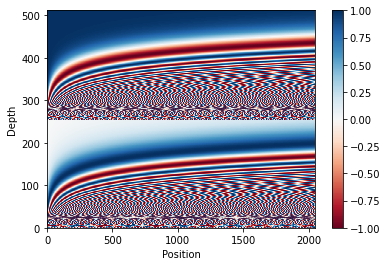
<p>Their proposed sinusoidal positional encoding is probably the most famous variant of positional encoding in transformer-like models. These are composed of sine and cosine values with position index as input.</p>

\[\begin{aligned}
PE_{(\text{pos},\ 2i)} &amp;=\sin \left(\operatorname{pos} / 10000^{2 i / d_{\text {model }}}\right) \\
PE_{(\text{pos},\ 2i+1)} &amp;=\cos \left(\operatorname{pos} / 10000^{2 i / d_{\text {model }}}\right)
\end{aligned}\]

<p>If we draw this equation, it looks like Figure 1.</p>

<figure>
  <img src="/images/sinusoidal-pe.png" alt="Visualization of sinusoidal positional encoding." />
  <figcaption>
    
    <b>Figure 1.</b>
    
    Visualization of sinusoidal positional encoding.
  </figcaption>
  
  <span class="figsource">
    Source: <a href="https://www.tensorflow.org/tutorials/text/transformer?hl=en" target="_blank">TensorFlow tutorial: Transformer model for language understanding</a>
  </span>
  
</figure>

<h3 id="relative-positional-encoding">Relative Positional Encoding</h3>

<p><a href="https://arxiv.org/abs/1803.02155">Shaw et al., 2018</a>,
<a href="https://arxiv.org/abs/1901.02860">Dai et al., 2019 (Transformer-XL)</a></p>

<h3 id="learning-to-encode-position-for-transformer-with-continuous-dynamical-model">Learning to Encode Position for Transformer with Continuous Dynamical Model</h3>

<p><a href="http://proceedings.mlr.press/v119/liu20n.html">Liu et al., 2020 (FLOATER)</a></p>

<h3 id="rethinking-positional-encoding">Rethinking Positional Encoding</h3>

<p><a href="https://openreview.net/forum?id=09-528y2Fgf">Ke et al., 2021</a></p>

<h2 id="generalization-beyond-position">Generalization Beyond Position</h2>

<h3 id="time-representation">Time Representation</h3>

<p><a href="https://arxiv.org/abs/1911.12864">Xu et al., 2019 (Bochner/Mercer Time Embedding)</a>,
<a href="https://arxiv.org/abs/1907.05321">Kazemi et al., 2019 (time2vec)</a>,
<a href="https://papers.nips.cc/paper/2019/hash/952285b9b7e7a1be5aa7849f32ffff05-Abstract.html">Voelker et al., 2019 (Legendre Memory Units)</a>
<a href="https://openreview.net/forum?id=whE31dn74cL">Xu et al., 2021 (Temporal Kernel)</a>,
<a href="https://openreview.net/forum?id=mXbhcalKnYM">Shukla and Marlin, 2021 (Multi-time attention)</a></p>

<h3 id="tree-positional-encoding">Tree Positional Encoding</h3>

<p><a href="https://papers.nips.cc/paper/2019/hash/6e0917469214d8fbd8c517dcdc6b8dcf-Abstract.html">Shiv and Quirk, 2019</a></p>

<h3 id="graph-positional-encodings-with-laplacian-eigenvectors">Graph Positional Encodings with Laplacian Eigenvectors</h3>

<p><a href="https://arxiv.org/abs/2006.09963">Qiu et al., 2020 (GCC)</a>,
<a href="https://arxiv.org/abs/2003.00982v3">Dwivedi et al., 2020 (Benchmarking GNNs)</a></p>]]></content><author><name>Dongkwan Kim</name><email>dongkwan.kim@tamu.edu</email></author><category term="Machine Learning Research" /><summary type="html"><![CDATA[Since I first saw the ‘Attention Is All You Need’ paper, I had a strong curiosity about the principle and theory of positional encoding. It is well understood that the Transformer did not have inductive biases for RNN architectures and thus introduced positional encoding. However, I have still not convinced how and why this works. The authors mentioned that they chose this design because of the special nature of sinusoid about the relative position, but it was not enough for me. … we hypothesized it would allow the model to easily learn to attend by relative positions, since for any fixed offset $k$, $PE_{pos+k}$ can be represented as a linear function of $PE_{pos}$. (Section 3.5 in Vaswani et al., 2017)]]></summary></entry><entry><title type="html">Blogs and Newsletters about Machine Learning</title><link href="https://dongkwan-kim.github.io/blogs/blogs-and-newsletter-about-machine-learning/" rel="alternate" type="text/html" title="Blogs and Newsletters about Machine Learning" /><published>2021-02-04T00:00:00+09:00</published><updated>2021-02-04T00:00:00+09:00</updated><id>https://dongkwan-kim.github.io/blogs/blogs-and-newsletter-about-machine-learning</id><content type="html" xml:base="https://dongkwan-kim.github.io/blogs/blogs-and-newsletter-about-machine-learning/"><![CDATA[<p>Here is a list of blogs and newsletters about machine learning that I follow (or regularly read).</p>

<h2 id="newsletters">Newsletters</h2>

<ul>
  <li><a href="https://www.deeplearningweekly.com/">Deep Learning Weekly</a></li>
  <li><a href="https://ruder.io/nlp-news/">NLP News (Sebastian Ruder)</a></li>
  <li><a href="https://paperswithcode.com/newsletter/">PwC Newsletter</a></li>
  <li><a href="https://huggingface.curated.co/">Huggingface Issue</a></li>
  <li><a href="https://graphml.substack.com/">GML Newsletter</a></li>
</ul>

<h2 id="blogs-researchers">Blogs (Researchers)</h2>

<ul>
  <li><a href="https://ruder.io/">Sebastian Ruder</a></li>
  <li><a href="https://lilianweng.github.io/lil-log/">Lil’Log</a></li>
  <li><a href="https://jalammar.github.io/">Jay’s ML Blog</a></li>
  <li><a href="https://amitness.com/">Amit Chaudhary</a></li>
  <li><a href="http://evjang.com/">Eric Jang</a></li>
  <li><a href="http://gregorygundersen.com/blog/">Gregory Gundersen</a></li>
</ul>

<h2 id="blogs-organization">Blogs (Organization)</h2>

<ul>
  <li><a href="https://ai.googleblog.com/">Google AI</a></li>
  <li><a href="https://www.deepmind.com/blog">DeepMind</a></li>
  <li><a href="https://www.microsoft.com/en-us/research/blog/">Microsoft Research</a></li>
  <li><a href="https://bair.berkeley.edu/blog/">BAIR Blog</a></li>
</ul>]]></content><author><name>Dongkwan Kim</name><email>dongkwan.kim@tamu.edu</email></author><category term="Machine Learning Research" /><category term="Machine Learning Engineering" /><summary type="html"><![CDATA[Here is a list of blogs and newsletters about machine learning that I follow (or regularly read).]]></summary></entry><entry><title type="html">Handing Struct Error when Using Python Multi-processing Pool</title><link href="https://dongkwan-kim.github.io/blogs/struct-error-python-multiprocessing/" rel="alternate" type="text/html" title="Handing Struct Error when Using Python Multi-processing Pool" /><published>2020-09-12T00:00:00+09:00</published><updated>2020-09-12T00:00:00+09:00</updated><id>https://dongkwan-kim.github.io/blogs/struct-error-python-multiprocessing</id><content type="html" xml:base="https://dongkwan-kim.github.io/blogs/struct-error-python-multiprocessing/"><![CDATA[<p>When using Python <code class="language-plaintext highlighter-rouge">multiprocessing.Pool</code> to process large data, I met this strange error.</p>
<div class="language-plaintext highlighter-rouge"><div class="highlight"><pre class="highlight"><code>struct.error: 'i' format requires -2147483648 &lt;= number &lt;= 2147483647
</code></pre></div></div>

<p>Looking at the internal structure, it seems that arguments are pickled before they are sent to child processes from the parent process.
When the size of arguments is too large for pickling (maybe more than 2147483647), this kind of struct error occurs.</p>
<div class="language-python highlighter-rouge"><div class="highlight"><pre class="highlight"><code><span class="kn">from</span> <span class="nn">multiprocessing</span> <span class="kn">import</span> <span class="n">Pool</span>

<span class="k">def</span> <span class="nf">f</span><span class="p">(</span><span class="n">data_id</span><span class="p">,</span> <span class="n">large_data</span><span class="p">):</span>
    <span class="k">pass</span>

<span class="k">if</span> <span class="n">__name__</span> <span class="o">==</span> <span class="s">'__main__'</span><span class="p">:</span>
    <span class="n">big_data</span> <span class="o">=</span> <span class="n">Data</span><span class="p">()</span>
    <span class="n">pool</span> <span class="o">=</span> <span class="n">Pool</span><span class="p">()</span>
    <span class="n">pool</span><span class="p">.</span><span class="n">starmap</span><span class="p">(</span><span class="n">f</span><span class="p">,</span> <span class="p">[(</span><span class="n">i</span><span class="p">,</span> <span class="n">big_data</span><span class="p">)</span> <span class="k">for</span> <span class="n">i</span> <span class="ow">in</span> <span class="nb">range</span><span class="p">(</span><span class="mi">100</span><span class="p">)])</span>
</code></pre></div></div>

<p>I don’t know whether there is an elegant solution, but it can be solved by declaring this data globally.</p>
<div class="language-python highlighter-rouge"><div class="highlight"><pre class="highlight"><code><span class="kn">from</span> <span class="nn">multiprocessing</span> <span class="kn">import</span> <span class="n">Pool</span>

<span class="k">def</span> <span class="nf">f</span><span class="p">(</span><span class="n">data_id</span><span class="p">):</span>
    <span class="k">global</span> <span class="n">big_data</span>
    <span class="n">large_data</span> <span class="o">=</span> <span class="n">big_data</span>

<span class="k">if</span> <span class="n">__name__</span> <span class="o">==</span> <span class="s">'__main__'</span><span class="p">:</span>
    <span class="n">big_data</span> <span class="o">=</span> <span class="n">Data</span><span class="p">()</span>
    <span class="n">pool</span> <span class="o">=</span> <span class="n">Pool</span><span class="p">()</span>
    <span class="n">pool</span><span class="p">.</span><span class="n">starmap</span><span class="p">(</span><span class="n">f</span><span class="p">,</span> <span class="p">[(</span><span class="n">i</span><span class="p">,)</span> <span class="k">for</span> <span class="n">i</span> <span class="ow">in</span> <span class="nb">range</span><span class="p">(</span><span class="mi">100</span><span class="p">)])</span>
</code></pre></div></div>]]></content><author><name>Dongkwan Kim</name><email>dongkwan.kim@tamu.edu</email></author><category term="General Computer Science &amp; Engineering" /><summary type="html"><![CDATA[When using Python multiprocessing.Pool to process large data, I met this strange error. struct.error: 'i' format requires -2147483648 &lt;= number &lt;= 2147483647]]></summary></entry><entry><title type="html">Run Tensorboard (or Jupyter) in a Remote Docker Container</title><link href="https://dongkwan-kim.github.io/blogs/tensorboard-in-a-docker-container/" rel="alternate" type="text/html" title="Run Tensorboard (or Jupyter) in a Remote Docker Container" /><published>2020-06-30T00:00:00+09:00</published><updated>2020-06-30T00:00:00+09:00</updated><id>https://dongkwan-kim.github.io/blogs/tensorboard-in-a-docker-container</id><content type="html" xml:base="https://dongkwan-kim.github.io/blogs/tensorboard-in-a-docker-container/"><![CDATA[<p>When creating a container, forward two ports 22 (for ssh) and 6006 (for Tensorboard).</p>
<div class="language-bash highlighter-rouge"><div class="highlight"><pre class="highlight"><code>docker run <span class="nt">-ti</span> <span class="nt">--runtime</span><span class="o">=</span>nvidia <span class="nt">-p</span> 8082:22 <span class="nt">-p</span> 8083:6006 nvidia/cuda:10.0-cudnn7-devel-ubuntu16.04 /bin/bash
</code></pre></div></div>

<p>We can access a container with ssh by,</p>
<div class="language-bash highlighter-rouge"><div class="highlight"><pre class="highlight"><code>ssh &lt;user&gt;@&lt;host&gt; <span class="nt">-p</span> 8082
</code></pre></div></div>

<h2 id="access-through-localhost">Access through localhost</h2>

<p>In a remote container, run Tensorboard with 6006 (the default port).</p>
<div class="language-bash highlighter-rouge"><div class="highlight"><pre class="highlight"><code>tensorboard <span class="nt">--logdir</span> lightning_logs
</code></pre></div></div>
<div class="language-plaintext highlighter-rouge"><div class="highlight"><pre class="highlight"><code>TensorFlow installation not found - running with reduced feature set.
Serving TensorBoard on localhost; to expose to the network, use a proxy or pass --bind_all
TensorBoard 2.2.2 at http://localhost:6006/ (Press CTRL+C to quit)
</code></pre></div></div>

<p>In a local machine, bind local’s 8083 port to remote’s 6006 port.</p>
<div class="language-plaintext highlighter-rouge"><div class="highlight"><pre class="highlight"><code>ssh -L 8083:127.0.0.1:6006 &lt;user&gt;@&lt;host&gt; -p 8082
</code></pre></div></div>

<p>Now, we can access the Tensorboard web interface using the address <code class="language-plaintext highlighter-rouge">localhost:8083</code> in a local machine.</p>

<p>You can use Jupyter in the same way. Just change 6006 to 8888 (the default port in Jupyter).</p>

<h2 id="access-through-ip-address-or-domain-name">Access through IP address or domain name</h2>

<p>If you want to access the Tensorboard through the IP address or domain name of the server, add <code class="language-plaintext highlighter-rouge">--host 0.0.0.0</code> to tensorboard command.</p>

<div class="language-bash highlighter-rouge"><div class="highlight"><pre class="highlight"><code>tensorboard <span class="nt">--logdir</span> lightning_logs <span class="nt">--host</span> 0.0.0.0
</code></pre></div></div>

<p>You can access the Tensorboard page with <code class="language-plaintext highlighter-rouge">http://&lt;host&gt;:8083</code> on any kind of machine connected to the internet.</p>]]></content><author><name>Dongkwan Kim</name><email>dongkwan.kim@tamu.edu</email></author><category term="Machine Learning Engineering" /><summary type="html"><![CDATA[When creating a container, forward two ports 22 (for ssh) and 6006 (for Tensorboard). docker run -ti --runtime=nvidia -p 8082:22 -p 8083:6006 nvidia/cuda:10.0-cudnn7-devel-ubuntu16.04 /bin/bash]]></summary></entry></feed>